
Linking & provisioning TDE Enabled (19c) Oracle EBS PDB
Pre-requisites
TDE-enabled vPDBs must be provisioned to a linked TDE-enabled CDB, not a vCDB.
The target container database should have an auto-login Keystore configured. For a cluster target, it is recommended to place auto-login Keystore on the ACFS storage instead of the Delphix mounted storage.
The Oracle EBS database version must be 19c (12c, 11g is not supported).
With 7.0.0.0 release, existing dSources can now have encrypted system tablespaces, and thus the resulting vPDBs will also have encrypted system tablespaces. Plugin doesn’t support encrypting an existing unencrypted vPDB - the encryption comes from the dSource.
Prior to 6.0.15.0, If the source has encrypted system tablespaces(SYSTEM, SYSAUX, UNDOTBS*), linking or ingestion of the source in Delphix Engine would fail.Source database keystores must not be on ASM storage.
Migration of a TDE-enabled vPDB from one CDB to another requires manual steps that must be completed for VDB migration to be successful and to support refresh and rewind operations on the migrated vPDB.
Only software keystores on the same host as the database files are supported. In particular, Oracle Key Vault is not supported.
The dSource from which the initial provision is done must be encrypted when it is linked. Existing dSources cannot be encrypted without unlinking and creating a new dSource.

Points to pay attention to:
A CDB with one PDB (single tenant) is currently the only certified deployment for Oracle E-Business Suite with Database 19c.
A CDB with multiple PDBs (multi-tenant) is not currently certified for Oracle E-Business Suite.
A non-CDB architecture is not planned to be certified or supported for EBS with Database 19c.
High-level steps:
Create a virtual dbTechStack using the plugin. Ensure that you remember the names of CDB, and PDB that end-user input in the Delphix Engine UI wizard because the same will be used during CDB (create on LOCAL mount point) and vPDB.
Refresh the target host environment in the Delphix Engine UI.
Create a TDE-enabled physical CDB with zero tenants on the target host.
Refresh the Target host environment in the Delphix Engine UI so that the discovery of physical CDB happens and you can see it on the UI.
Copy source DB Keystore (WALLET_ROOT) files
cwallet.sso,ewallet.p12to the target server.During VDB provision, use physical TDE-enabled CDB to plug vPDB.
Create new EBS services in vPDB. To avoid confusion, delete the EBS services that have drifted downstream from dsource to target vPDB.
Create appTier using the plugin.
Linking of the Source TDE PDB
Login to the Delphix Management application.
Go to Manage > Environments.
Click the Details tab.
Click on the edit icon next to ATTRIBUTES.
In the TDE Keystores Root field, enter the path for the TDE Keystores root directory.
Click the tick mark button to save the configuration.
Adding or Editing the TDE Keystores Root Directory Path
The TDE Keystores root directory path is specified on the Details tab under Environments. To edit the path, do the following:
Login to the Delphix Management application.
Go to Manage > Environments.
Click the Details tab of the environment.
Click on the edit icon next to ATTRIBUTES to set or update attributes, including the Keystores root directory path.

Adding or Editing the Target Keystore Password
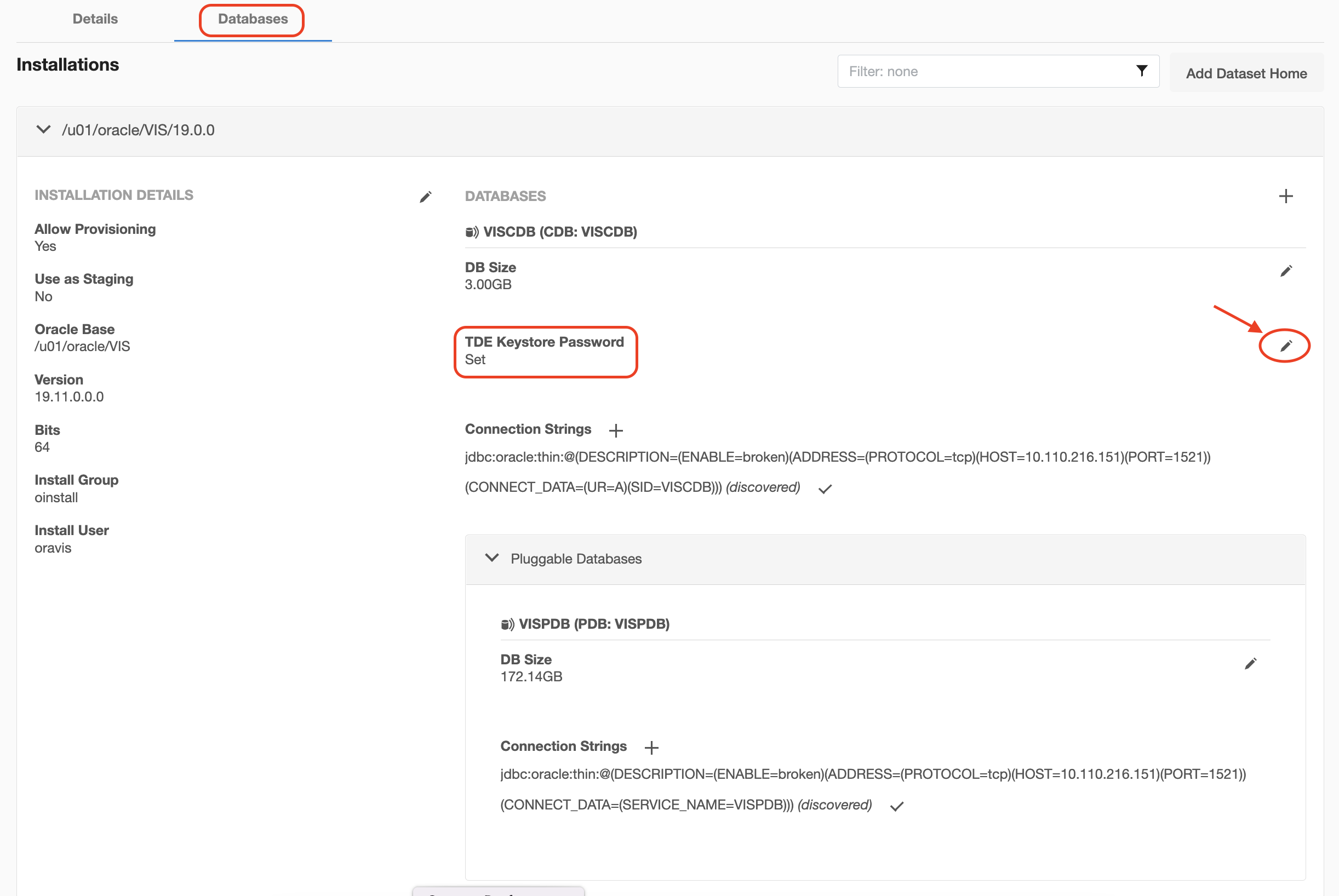
The target Keystore password is specified on the Databases tab under Environments. To add or edit the target Keystore password, do the following:
Login to the Delphix Management application.
Go to Manage > Environments.
Click the Databases tab of the Environment.
Click on the edit icon next to TDE Keystore Password to set or update the password.
Click on Add source. The Add dsource wizard displays.
Fill in the details and click Submit.
For more information, see Linking an Oracle Pluggable Database & Linking Data Sources with Oracle.
After you have successfully linked the source PDB:
Create a dbTechStack on the target server using the plugin.
Refresh the target host environment in the Delphix Engine UI.
Prerequisites for Provisioning a vPDB to a Linked CDB
There must be a target environment that has an Oracle installation compatible with the Oracle installation of the source CDB and the source PDB. The following database requirements are a must to provision the vPDB to a linked CDB. For more information, see Requirements for Oracle Hosts and Databases.
Recommend autodiscovery so that the linked CDB can be found. Otherwise, the linked CDB must be manually discovered before provisioning.
Linked CDB must be running.
Linked CDB must be in ARCHIVELOG mode.
Linked CDB should be using Block Change Tracking (BCT).
LogSync must be enabled for the Linked CDB.
Provisioning a vPDB to a Linked CDB
For provisioning a vPDB into a Linked CDB, the source CDB and the target CDB must meet the following compatibility requirements:
The value of the COMPATIBLE parameter in the source CDB must be less than or equal to the value of the COMPATIBLE parameter in the target CDB.
They must have the same endianness.
They must have compatible character sets and national character sets.
Creating TDE-enabled Physical CDB with Zero Tenants on the Target Host
It is mandatory to create a physical container database with the same name that was entered during virtual dbTechStack provision.
Creating Container Database using DBCA Utility on the Target Host
In the below template or example, Value of variables can change according to your environment. For example, $ORACLE_HOME path value. Parameters value like gdbname, sid, totalMemory, datafileDestination, recoveryAreaDestination, sysPassword, systemPassword, characterSet, nationalCharacterSet, db_domain, open_cursors, db_files, processes, parallel_max_servers, parallel_min_servers, job_queue_processes, local_listener, sessions, sga_target, db_recovery_file_dest_size, db_recovery_file_dest, diagnostic_dest,log_archive_dest_1, audit_file_dest, control_files, etc. mentioned in dbca command can be altered according to your environment.
Below is an example illustrating the creation of a physical container database using DBCA utility on the local storage directory.
Create physical container database using DBCA utility on local storage directory
Go to DBTECHSTACK $ORACLE_HOME/bin
#Example -
export ORACLE_HOME=/u01/oracle/VIS/19.0.0
export PATH=$ORACLE_HOME/bin:$PATH
cd $ORACLE_HOME/bin

#create database directories on Local storage
mkdir -p /u03/oracle/VIS/oradata/TDETGT /u03/oracle/VIS/admin/TDETGT/adump  /u03/oracle/VIS/FRA/TDETGT

#Customer can input/modify dbca config parameters of his/her choice like gdbname, SGA, PGA etc.
./dbca -silent -createDatabase -responseFile NO_VALUE -gdbname TDETGT -sid TDETGT -templateName General_Purpose.dbc -createAsContainerDatabase true -useLocalUndoForPDBs true -databaseType MULTIPURPOSE  -automaticMemoryManagement FALSE  -totalMemory 4096 -storageType FS -datafileDestination /u03/oracle/VIS/oradata/TDETGT -recoveryAreaDestination /u03/oracle/VIS/FRA  -sysPassword Welcome1 -systemPassword Welcome1 -emConfiguration NONE -characterSet AL32UTF8 -nationalCharacterSet AL16UTF16 -sampleSchema false -redoLogFileSize 1024 -enableArchive true -ignorePreReqs -initparams aq_tm_processes=1 ,"_pdb_name_case_sensitive"=true ,audit_trail='none' ,compatible='19.0.0' ,cursor_sharing='EXACT' ,db_block_checking='FALSE' ,db_block_checksum='TRUE' ,db_block_size=8192 ,db_domain='' ,dml_locks=10000 ,enable_pluggable_database=true ,event='10995 trace name context forever, level 16','10946 trace name context forever, level 8454144' ,log_archive_format='%t_%s_%r.dbf' ,log_buffer=10485760 ,log_checkpoint_interval=100000 ,log_checkpoint_timeout=1200 ,log_checkpoints_to_alert=TRUE ,max_dump_file_size='20480' ,nls_comp='BINARY' ,nls_date_format='DD-MON-RR' ,nls_language='AMERICAN' ,nls_length_semantics='BYTE' ,nls_numeric_characters='.,' ,nls_sort='BINARY' ,nls_territory='AMERICA' ,optimizer_secure_view_merging=FALSE ,parallel_force_local=TRUE ,plsql_code_type='INTERPRETED' ,open_cursors=600 ,db_files=512 ,processes=400 ,recyclebin='off' ,remote_login_passwordfile='EXCLUSIVE' ,sql92_security=TRUE ,temp_undo_enabled=TRUE ,undo_management='AUTO' ,undo_tablespace='UNDOTBS1' ,workarea_size_policy='AUTO' ,parallel_max_servers=8 ,parallel_min_servers=0 ,job_queue_processes=4000 ,local_listener='uktde19ctarget:1521',session_cached_cursors=500 ,sessions=800 ,sga_target=3G ,db_recovery_file_dest_size=100494m ,db_recovery_file_dest=/u03/oracle/VIS/FRA ,diagnostic_dest='/u03/oracle/VIS' ,log_archive_dest_1='LOCATION=USE_DB_RECOVERY_FILE_DEST' ,audit_file_dest='/u03/oracle/VIS/admin/TDETGT/adump' ,control_files='/u03/oracle/VIS/oradata/TDETGT/control101.ctl','/u03/oracle/VIS/FRA/TDETGT/control102.ctl'
Sometimes DBCA utility fails with an error message, showing Error While Restoring PDB Backup Piece while creating a new container database; Details can be found in DBCA Fails With “Error While Restoring PDB Backup Piece” While Creating A New Container Database (Doc ID- 2730365.1) found at https://support.oracle.com.You can resolve this by removing db_recovery_file_dest=/u03/oracle/VIS/FRA from dbca command.
Enabling TDE on the Target Container Database using High privilege user like oracle or oravis etc.
It is mandatory to have TDE-enabled with AUTO LOGIN Keystore on the target container database. Therefore, you must create an autologin TDE Keystore on the local file system directory /home/oravis/wallet. This step will create a TDE directory inside /home/oravis/wallet. Make sure the database is running from SPFILE.
Below is an example:
Enabling TDE on target container database
Source CDB environment file
sqlplus / as sysdba
mkdir -p /home/oravis/wallet
show parameter spfile;
alter system set WALLET_ROOT="/home/oravis/wallet" scope=spfile;
shutdown immediate;
startup;
alter system set TDE_CONFIGURATION="KEYSTORE_CONFIGURATION=FILE" scope=both;
show parameter tde_configuration;
show parameter wallet_root;

## Create the password protected key store
administer key management create keystore identified by welcome1;
administer key management create LOCAL auto_login keystore from keystore '/home/oravis/wallet/tde' identified by welcome1;

administer key management set keystore open force keystore identified by welcome1;
administer key management set keystore open force keystore identified by welcome1 container=all;
administer key management set key FORCE KEYSTORE identified by welcome1 with backup;

#To verify the TDE keystore is AUTO LOGIN & in OPEN state
select WRL_TYPE, WRL_PARAMETER, WALLET_TYPE, STATUS, CON_ID from v$encryption_wallet;
SELECT KEY_ID,creation_time,activation_time,tag FROM V$ENCRYPTION_KEYS;

#Take a full backup of Keystore
administer key management backup keystore using 'Walletfullbackup' force keystore identified by welcome1;
shutdown immediate;
startup;
Enabling TDE on the Target Container Database using Low privilege user like delphix_os etc.
It is mandatory to have TDE-enabled with AUTO LOGIN Keystore on the target container database. Therefore, you must create an autologin TDE Keystore on the local file system directory /u01/wallet. This step will create a TDE directory inside /u01/wallet. Make sure the database is running from SPFILE.
For enabling TDE on the target container database using low privilege user, follow the below steps:
Create a directory similar to
/u01/walleton local mount point, which will be referred as WALLET_ROOT directory.Create another directory similar to
/u01/source_walleton local mount point, which will be referred as Parent Database TDE Keystore Location, which holds theewallet.p12andcwallet.ssofiles from source databaseThe permission on Parent Database TDE Keystore Location must be 770.
The permission on WALLET_ROOT Location directory must be 770.
The permission on copied
ewallet.p12andcwallet.ssofiles from source database to target server must be 660.
Below is an example:
Enabling TDE on target container database
mkdir -p /u01/wallet

#Login as Low privilege user(delphix_os) and run the below commands -
Source CDB environment file
sqlplus / as sysdba
alter system set WALLET_ROOT="/u01/wallet" scope=spfile;
shutdown immediate;
startup;
alter system set TDE_CONFIGURATION="KEYSTORE_CONFIGURATION=FILE" scope=both;
show parameter tde_configuration;
show parameter wallet_root;

## Create the password protected key store
administer key management create keystore identified by targetkey_password;
administer key management create LOCAL auto_login keystore from keystore '/u01/wallet/tde' identified by targetkey_password;

administer key management set keystore open force keystore identified by targetkey_password;
administer key management set keystore open force keystore identified by targetkey_password container=all;
administer key management set key FORCE KEYSTORE identified by targetkey_password with backup;

#To verify the TDE keystore is AUTO LOGIN & in OPEN state
select WRL_TYPE, WRL_PARAMETER, WALLET_TYPE, STATUS, CON_ID from v$encryption_wallet;
SELECT KEY_ID,creation_time,activation_time,tag FROM V$ENCRYPTION_KEYS;

#Take a full backup of Keystore
administer key management backup keystore using 'Walletfullbackup' force keystore identified by targetkey_password;
shutdown immediate;
startup;
Linking the TDE-enabled CDB on the Target Server
Adding or Editing the TDE Keystores Root Directory Path
For details about adding or editing the TDE Keystores root directory path, see the Adding or Editing the TDE Keystores Root Directory Path section above.
Adding or Editing the Target Keystore Password
For details about adding or editing the target Keystores password, see the Adding or Editing the Target Keystore Password section above.
Provisioning a TDE-enabled vPDB
To initiate the provisioning operation, Delphix Engine needs the following information (all of which can be specified in the GUI or CLI):
Parameter | Description | CLI Parameter | Required or not. |
|---|---|---|---|
Parent Keystore path | Path to a Keystore that contains the keys used to encrypt the dSource data files. This Keystore must be located on the target system. It does not have to be in the location specified by |
| yes |
Parent Keystore password | Password for the parent Keystore. This parameter can be updated if the password is changed. |
| yes |
Parent Keystore password | When exporting keys to a key file from a Keystore, Oracle requires a password to be set. Once specified, this cannot be changed for the life of the vPDB. |
| yes |
Parent Keystore password | Password for the target Keystore. This parameter can be updated if the password is changed. |
| yes |
Keystores root directory path | Path to a directory on the target host under which all Delphix-related TDE artifacts will be created. This includes Keystores used by the auxiliary CDB during provisioning and the artifact directories for TDE-enabled vPDBs. |
| yes for cluster targets, optional for single instance targets |
Copy the source DB Keystore (WALLET_ROOT) files cwallet.sso, ewallet.p12 to a target server and mention that location in “Parent Database TDE Keystore Location”.
On Source CDB, run below query to get WALLET_ROOT(files cwallet.sso, ewallet.p12) location -
select wrl_parameter from v$encryption_wallet;
WRL_PARAMETER
------------------------
/home/oravis/wallet/tde/
It is mandatory to copy the ewallet.p12 file from the source to the target server for the target container database to use it. No exporting of keys is needed, this is done by the Delphix Engine using the path and secrets provided in the configuration. On the target server, cwallet.sso, ewallet.p12 files should be owned by the ORACLE_HOME installation owner.

The Parent Database TDE Keystore Location is the location of the Keystore for the dSource that can be the actual location if it’s provisioning back to the source, or else it needs to be copied to the target. The Parent Database TDE keystore Password is the dSource Keystore password. You can enter any value inside the TDE Secret for Exported Keys mandatory field, which is used while exporting and importing encryption keys.
.png)
Once a TDE-enabled vPDB is provisioned, it can be used the same as a non-TDE-enabled vPDB within Delphix, with the exception of migrating (For more information, see Migrating a TDE-enabled vPDB). There are however a few caveats:
A refresh operation will use the parent Keystore for the recovery. If the dSource is rekeyed, then you will need to update the parent Keystore with the new keys. Similarly, if the location or password to the parent Keystore has changed, then they should be updated before the refresh.
A rewind operation will use the target Keystore for the recovery. If the vPDB is rekeyed after it is provisioned, then the rekey will update the target Keystore, so it does not need to be updated in the Delphix Engine.
Each disable operation will result in the keys being exported to an exported key file in the artifact directory to be used for a subsequent enable. Refresh and rewind operations will first disable the existing vPDB, so those will also result in a newly exported key file in the artifact directory.
Provisioning a second-generation vPDB (vvPDB) from a TDE-enabled vPDB is done in the same manner as a first-generation vPDB; by specifying the TDE parameters during provision. The current Keystore for the vPDB can be specified as the parent Keystore.
The final vPDB is on Delphix storage while the target-linked CDB and its archive logs remain on user storage.For TDE-enabled vPDBs, use manual hooks in configure clone and Pre-snapshot. You should not use the hooks utility feature with TDE-enabled virtual database.
For versions 19.3 or later, follow the below guidelines if you see any of the following error:
ORA-01017: invalid username/password logon denied
ORA-28040 During cloning: No Matching Authentication Protocol
EBS application database user accounts created in the earlier release uses a case-insensitive password version from an earlier release authentication protocol, such as the 10G password version. If your release user account passwords have not been reset and the following conditions persists, then take the action as described below:
On source, the database server has been configured with SEC_CASE_SENSITIVE_LOGON set to FALSE, so that it can only authenticate users who have a 10G case-insensitive password version. Then, on target container VDB, it becomes necessary to set the SEC_CASE_SENSITIVE_LOGON to FALSE, to make authentication of users successful.
To take advantage of the password protections introduced in Oracle Database 19c, users must change their passwords.
Occasionally, it is necessary to restart the database to resolve connectivity to the database. This is atypical but may be necessary.To set-up target:
On target container database, run the following command:
alter system set SEC_CASE_SENSITIVE_LOGON=FALSE scope=both;
Configure Clone First Hook for a 19c Multi-Tenant High Privileged User
Configure Clone First Hook for a 19c Multi-Tenant High Privileged User
#!/usr/bin/env bash
# shellcheck source=/dev/null
# Need `echo` and `cat` to process the text
# shellcheck disable=SC2116,SC2002
# NOTE: Ensure the below environment variables will be set up correctly by the
# shell. If not, hardcode or generate the values below.
# Input the SOURCE_PDB_NAME enclosed in double quotes.
SOURCE_PDB_NAME="TDEPDB"
CONTEXT_NAME=${DELPHIX_PDB_NAME}_$(hostname -s)
APPS_PASSWD=$(cat "/var/tmp/${ORACLE_SID}_source_apps_file.txt")
. "${ORACLE_HOME}/${ORACLE_SID}_$(hostname -s).env";
# Check for local_listener parameter is set for PDB, otherwise set it
# appropriately
check_value=$(sqlplus -s "/ as sysdba" <<EOF
alter session set container="${DELPHIX_PDB_NAME}";
show parameter local_listener;
EOF
)
local_listener=$(echo "$check_value" | awk '{print $11}')
value=("${local_listener//:/ }")
host=$(echo "${value[0]}")
port=$(echo "${value[1]}")
curr_port=$(cat "${ORACLE_HOME}/network/admin/listener.ora" | grep PORT | awk '{print $9}' | sed 's/)//g')
if [[ $port != "$curr_port" || $host != "$(hostname -s)" ]]; then
sqlplus -s "/ as sysdba" <<EOF
alter session set container="${DELPHIX_PDB_NAME}";
alter system set local_listener='$(hostname -s):${curr_port}';
alter system register;
EOF
fi
#Create, Start EBS PDB services and Delete Source PDB services
. "${ORACLE_HOME}/${ORACLE_SID}_$(hostname -s).env";
sqlplus -s "/ as sysdba" <<EOF
alter session set container="${DELPHIX_PDB_NAME}";
BEGIN DBMS_SERVICE.STOP_SERVICE( service_name => '${SOURCE_PDB_NAME}_ebs_patch'); end ;
/
BEGIN DBMS_SERVICE.STOP_SERVICE( service_name => 'ebs_${SOURCE_PDB_NAME}'); end;
/
BEGIN DBMS_SERVICE.DELETE_SERVICE( service_name => '${SOURCE_PDB_NAME}_ebs_patch'); end ;
/
BEGIN DBMS_SERVICE.DELETE_SERVICE( service_name => 'ebs_${SOURCE_PDB_NAME}'); end;
/
BEGIN DBMS_SERVICE.CREATE_SERVICE( service_name => 'ebs_${DELPHIX_PDB_NAME}', network_name => 'ebs_${DELPHIX_PDB_NAME}');
end;
/
BEGIN DBMS_SERVICE.CREATE_SERVICE( service_name => '${DELPHIX_PDB_NAME}_ebs_patch', network_name => '${DELPHIX_PDB_NAME}_ebs_patch');
end;
/
BEGIN DBMS_SERVICE.START_SERVICE( service_name => 'ebs_${DELPHIX_PDB_NAME}');
end;
/
BEGIN DBMS_SERVICE.START_SERVICE( service_name => '${DELPHIX_PDB_NAME}_ebs_patch');
end;
/
alter system register;
EOF
sqlplus "/ as sysdba" <<EOF
@${ORACLE_HOME}/appsutil/install/${CONTEXT_NAME}/adupdlib.sql so
EOF
. "${ORACLE_HOME}/${CONTEXT_NAME}.env";
perl "${ORACLE_HOME}/appsutil/clone/bin/adcfgclone.pl" dbconfig "${CONTEXT_FILE}" <<EOF
${APPS_PASSWD}
EOF
Configuring the clone hook will blindly create and start the services. Furthermore, no validation on services has been implemented but definitely, this will get improve over time.
Configure Clone First Hook for a 19c Multi-Tenant Low Privileged User
Configure Clone First Hook for a 19c Multi-Tenant Low Privileged User
#!/usr/bin/env bash
#
# Copyright (c) 2022 by Delphix. All rights reserved.
#
# shellcheck source=/dev/null
# NOTE: Ensure the below environment variables will be set up correctly by the
# shell. If not, hardcode or generate the values below.
# Input the SOURCE_PDB_NAME enclosed in double quotes.
# Input the DLPX_PRIV_USER according to your environment setup.
SOURCE_PDB_NAME="TDEPDB"
DLPX_DB_EXEC_SCRIPT="<Remote BIN location till dlpx_db_exec script>"
DLPX_PRIV_USER=oravis
APPS_PASSWD=$(cat "/var/tmp/${ORACLE_SID}_source_apps_file.txt")
CONTEXT_NAME=${DELPHIX_PDB_NAME}_$(hostname -s)

"${DLPX_DB_EXEC_SCRIPT}" -u"${DLPX_PRIV_USER}" ". ${ORACLE_HOME}/${ORACLE_SID}_$(hostname -s).env;"

# Check for local_listener parameter is set for PDB, otherwise set it appropriately
check_value=$("${DLPX_DB_EXEC_SCRIPT}" -u"${DLPX_PRIV_USER}" ". ${ORACLE_HOME}/${CONTEXT_NAME}.env; sqlplus -s \"/ as sysdba\" <<-EOF
alter session set container=${DELPHIX_PDB_NAME};
show parameter local_listener;
EOF
")

local_listener=$(echo "$check_value" | awk '{print $11}')
value=("${local_listener//:/ }")
host="${value[0]}"
port="${value[1]}"

curr_port=$(grep PORT < "${ORACLE_HOME}/network/admin/listener.ora" | awk '{print $9}' | sed 's/)//g')

if [[ $port != "$curr_port" || $host != "$(hostname -s)" ]]; then
    "${DLPX_DB_EXEC_SCRIPT}" -u"${DLPX_PRIV_USER}" ". ${ORACLE_HOME}/${ORACLE_SID}_$(hostname -s).env; sqlplus -s \"/ as sysdba\" <<EOF
    alter session set container=${DELPHIX_PDB_NAME};
    alter system set local_listener='$(hostname -s):${curr_port}';
    alter system register;
EOF
"
fi

#Create, Start EBS PDB services and Delete Source PDB services
"${DLPX_DB_EXEC_SCRIPT}" -u"${DLPX_PRIV_USER}" ". ${ORACLE_HOME}/${ORACLE_SID}_$(hostname -s).env; sqlplus -s "/ as sysdba" <<EOF
alter session set container="${DELPHIX_PDB_NAME}";
BEGIN DBMS_SERVICE.STOP_SERVICE( service_name => '${SOURCE_PDB_NAME}_ebs_patch'); end ;
/
BEGIN DBMS_SERVICE.STOP_SERVICE( service_name => 'ebs_${SOURCE_PDB_NAME}'); end;
/
BEGIN DBMS_SERVICE.DELETE_SERVICE( service_name => '${SOURCE_PDB_NAME}_ebs_patch'); end ;
/
BEGIN DBMS_SERVICE.DELETE_SERVICE( service_name => 'ebs_${SOURCE_PDB_NAME}'); end;
/
BEGIN DBMS_SERVICE.CREATE_SERVICE( service_name => 'ebs_${DELPHIX_PDB_NAME}', network_name => 'ebs_${DELPHIX_PDB_NAME}');
end;
/
BEGIN DBMS_SERVICE.CREATE_SERVICE( service_name => '${DELPHIX_PDB_NAME}_ebs_patch', network_name => '${DELPHIX_PDB_NAME}_ebs_patch');
end;
/
BEGIN DBMS_SERVICE.START_SERVICE( service_name => 'ebs_${DELPHIX_PDB_NAME}');
end;
/
BEGIN DBMS_SERVICE.START_SERVICE( service_name => '${DELPHIX_PDB_NAME}_ebs_patch');
end;
/
alter system register;
EOF
"

"${DLPX_DB_EXEC_SCRIPT}" -u"${DLPX_PRIV_USER}" ". ${ORACLE_HOME}/${ORACLE_SID}_$(hostname -s).env; sqlplus \"/ as sysdba\" <<-EOF
@${ORACLE_HOME}/appsutil/install/${CONTEXT_NAME}/adupdlib.sql so
EOF
"
"${DLPX_DB_EXEC_SCRIPT}" -u"${DLPX_PRIV_USER}" ". ${ORACLE_HOME}/${CONTEXT_NAME}.env; perl ${ORACLE_HOME}/appsutil/clone/bin/adcfgclone.pl dbconfig ${ORACLE_HOME}/appsutil/${CONTEXT_NAME}.xml <<-EOF1
${APPS_PASSWD}
EOF1
"
The remaining configure clone & pre-snapshot hooks have no change in them. It is mandatory to use hooks mentioned in documentation while provisioning EBS virtual PDB or database.