
Network architecture
The diagram Delphix Virtualizing and Masking SQL Server Network Architecture below depicts the overall network architecture for Delphix virtualizing and masking SQL Server. In the diagram, each of the arrows represents the direction of a network connection between two nodes. Next to each arrow is a label indicating the network protocol (TCP) and the port number indicating the network service. Also, indicated in red are the recommended network latencies between the major components of the architecture.
You can optionally configure a separate Connector Environment, specifically used to discover databases on the source during Environment creation. You can also use your Staging Target Host to be used as the Connector Environment, as seen in the image below.
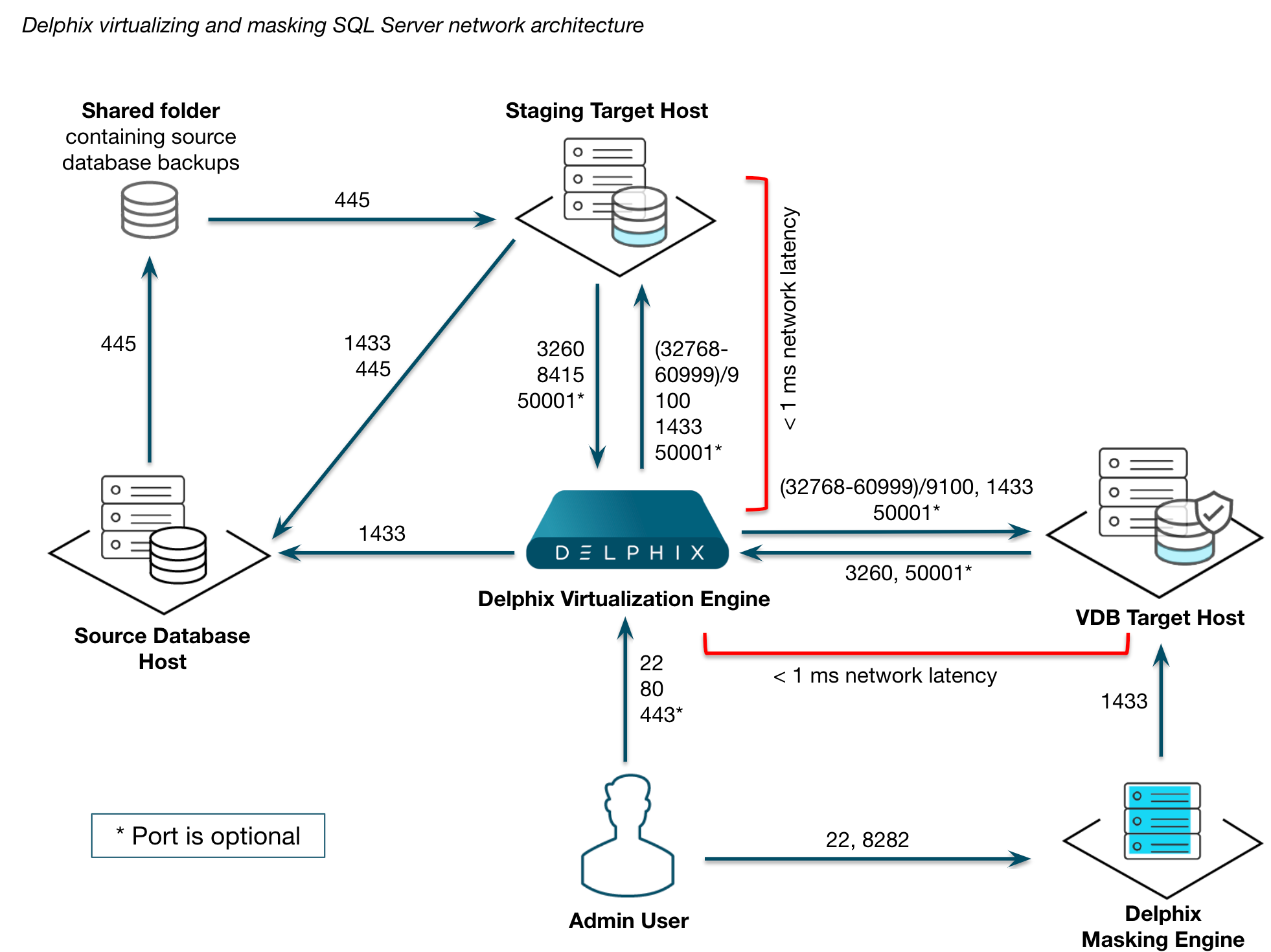
Delphix Virtualizing and Masking SQL Server Network Architecture
Ports
Based on the table below, the Windows Network Administrator needs to complete a series of tasks. For each port listed, determine whether it must be opened in your firewall between your Delphix Engine and source or target systems. Work with your Delphix Administrator to understand what requirements are there, and ensure that they have been met before proceeding.
|
Port |
Network Service |
Required for virtualization? |
Required for masking? |
Description and usage |
|---|---|---|---|---|
|
22 |
SSH |
Yes |
Yes |
Used for accessing command-line interface (CLI) and internal Delphix OS accounts |
|
80 |
HTTP |
Yes |
No |
Used for GUI console access on Delphix Engine by default, disabled when HTTPS in use |
|
443 |
HTTPS |
Yes |
No |
Used for GUI console access on Delphix Engine, disabled when HTTP in use |
|
445 |
SMB |
Yes |
No |
Used for attaching shared folders on Windows. To take a copy-only backup or use Delphix Managed backups, this port is required to allow the source environment access to the staging environment. |
|
1433 |
JDBC |
Yes |
Yes |
Used for accessing SQL Server databases for queries on data-dictionary. This port is the default, but you can use other ports instead.
|
|
3260 |
iSCSI |
Yes |
No |
Used for network-attached storage (NAS) on Windows database servers |
|
8415 |
DSP |
Yes |
No |
Used for SQL Server hooks, when enabled. This port needs to be open between the Delphix Engine and the VDB target. |
|
(32768-60999)/9100 |
Delphix Windows Connector |
Yes |
No |
Used for connecting to the Delphix Connector service installed on Windows target database servers. |
|
50001 |
iPERF |
No |
No |
Used for network throughput testing with the open-source iPerf package through the Delphix CLI, this is purely optional (but useful) functionality |
AppData port requirements
For unstructured files and AppData port requirements, please visit the Network and Connectivity Requirements for Windows Environment article.