
Taking a snapshot creates a new snapshot entry in the dSource’s Timeflow.
Snapshot (default)
This section lists the steps to take a snapshot and delete the same.
-
Login to the Delphix Management application.
-
Click Manage and select Datasets from the dropdown list.
-
Select the dSource you want to Snapshot.
-
Click the Camera icon. Alternatively, click the arrow next to the Camera icon and select Snapshot (default).
-
From the Snapshot dialog, select Perform Snapshot.
-
Click View: under Timeflow to verify the Snapshot you just created.
-
To delete, select the snapshot you just created, and from the Actions menu (...) select Delete Snapshot.
-
In the Delete Snapshot dialog, select Delete.
-
Click View: under Timeflow to verify the Snapshot, you just deleted.
Snapshot with parameters
This section lists the steps to take a snapshot with parameters and delete the same.
-
Login to the Delphix Management application.
-
Click Manage and select Datasets from the dropdown list.
-
Select the dSource you want to Snapshot.
-
Click the arrow next to the Camera icon and select Snapshot with Params....
-
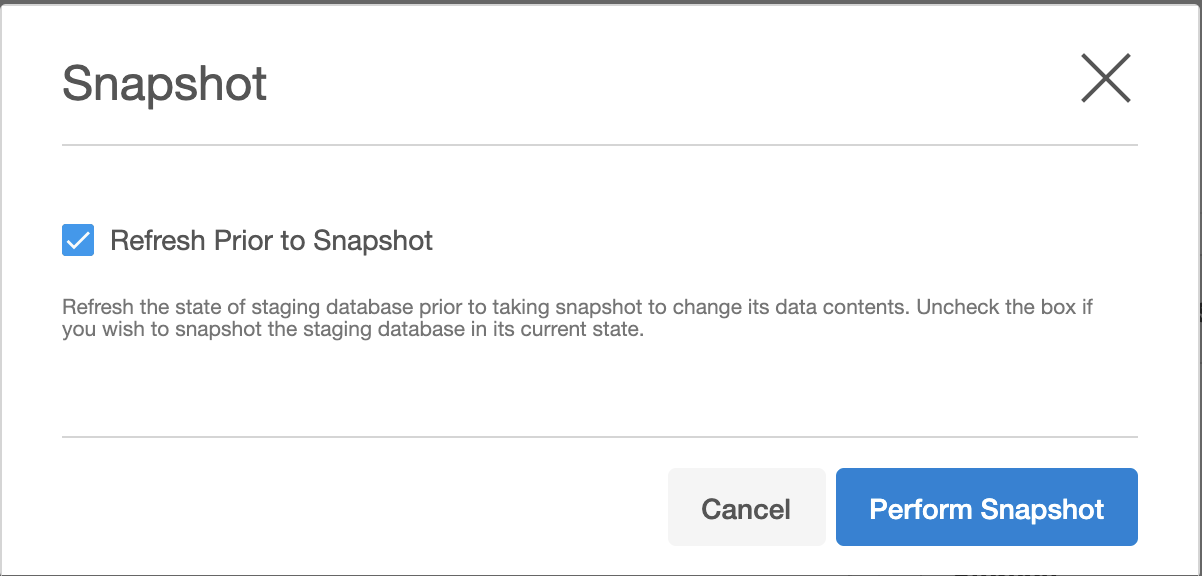
Select Refresh Prior to Snapshot to refresh the staging database. This will refresh the staging database prior to taking the snapshot.
-
In the Snapshot dialog, select Perform Snapshot.
-
Click View: under Timeflow to verify the Snapshot you just created.
-
To delete, select the snapshot you just created, and from the Actions menu (...) select Delete Snapshot.
-
Click View: under Timeflow to verify the Snapshot, you just deleted.